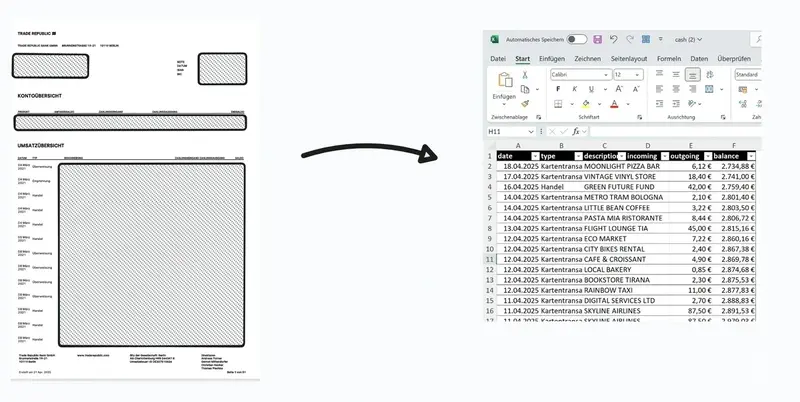


Trade Republic CSV export - how it works
Our free Trade Republic CSV export converter turns your PDF account statements into Excel, CSV, or JSON in just a few clicks. The entire process runs directly in your browser - no cloud uploads, no data sharing, no signup required. If you're looking for trade republic pdf to csv, this is exactly what the tool delivers.
Export Trade Republic transactions - all options
With our tool you can export Trade Republic transactions and your account activity. Whether you need a CSV export or Excel export, the converter supports all common formats for your financial analysis.
Which data can I export?
- All transactions as CSV or Excel
- Income and expenses in a structured export
- Statement data prepared for tax advisors
- Portfolio movements analyzed in detail
- Money market fund activity evaluated separately
Trade Republic Excel export - professional financial analysis
The Trade Republic Excel export is ideal for anyone who wants to analyze financial data professionally. Trade Republic does not provide a direct export of your transactions into tabular formats. For financial planning, tax filings, or portfolio analysis, Excel and CSV files are often essential. That is where our converter comes in.
Why export Trade Republic data?
- Optimize tax advice: Structured data for efficient processing
- Portfolio analysis: Detailed evaluation of your investments
- Categorize spending: Better overview of inflows and outflows
- Keep a household budget: Integrate into your overall financial planning
Guide: export Trade Republic transactions
Exporting Trade Republic activity has never been easier. Follow this step-by-step guide:
How the converter works - in three simple steps:
- Choose PDF (no upload required) - select your Trade Republic statement as a PDF (all data stays local in your browser)
- Analyze - with one click, all transaction data is extracted and structured automatically
- Export - save the results as Excel, CSV, or JSON on your device
How to find your Trade Republic account statement
You can easily download the statement in the Trade Republic app:
- Open the Trade Republic app on your smartphone
- Tap your profile icon in the bottom right (or the "Profile" menu item)
- Scroll down to the "Documents" or "More" section
- Tap "Statements" or "Account statements"
- Select the desired time range and download the PDF
- Transfer the PDF to your computer or use the tool directly on your mobile device
What makes this Trade Republic export converter special?
- 100% local processing: Your sensitive financial data never leaves your browser
- Intelligent extraction: Detects both cash transactions and money market fund activity
- No registration: No accounts, no email address, no user profiles - just use it
- Multiple export formats: CSV export, Excel export, or JSON - ideal for different use cases
- Clear visualization: Clean charts give you an instant overview of your financial movements
- Transparent and free: No hidden fees, no ads, no usage limits
Benefits of export for your financial management
With the exported data from the Trade Republic CSV export you can do much more than with a static PDF:
- Optimize tax advice: Provide your tax advisor with structured data for faster processing
- Run portfolio analysis: Import transactions into analysis tools for deeper insights
- Export expenses: Sort and group inflows and outflows by your own criteria
- Create your own reports: Use Excel formulas and pivot tables for custom reporting
- Keep a household budget: Integrate Trade Republic transactions into your overall planning
Supported data formats for Trade Republic export
The converter extracts all key information from your Trade Republic statements:
- Cash transactions: date, transaction type, description, inflow, outflow, balance
- Money market funds (MMF): date, transaction type, fund name, ISIN, quantity, price, amount
- Securities trading: buy and sell details with product identifier and amounts
- Deposits and withdrawals: all transfers with full reference information
Feedback and support
If you run into problems, have suggestions, or want the tool adapted for other brokers, contact me via jonathanpagel.com. I would also appreciate a coffee: buy me a coffee.
Frequently asked questions - Trade Republic export
How can I export Trade Republic transactions?
Upload your PDF statement and click "Extract transactions". All transactions are detected automatically and can be exported as CSV or Excel. The entire Trade Republic export process takes only a few seconds.
Can I export my Trade Republic activity?
Yes, the converter detects all income and expenses from your statement and prepares them for export. You can export individual transactions or all activity.
Which formats does the Trade Republic CSV export support?
The converter supports CSV export, Excel export (XLSX), and JSON. All formats are compatible with common analysis tools and spreadsheets.
Is the tool really completely free?
Yes, usage is 100% free with no restrictions. There is no premium version or hidden features for the Trade Republic export.
Is it safe to upload my statements?
Absolutely. All processing happens locally in your browser. The PDFs and their content are never transmitted to a server. You can even inspect the source code of this page. Or just turn off Wi-Fi, upload the statement, and convert it - once the page is loaded, it does not need the internet.
Can I convert historical statements as well?
Yes, the tool works with all Trade Republic statements, regardless of date. You can even upload multiple Trade Republic PDF statements in a row to convert them to Excel or CSV and export them.
Can I export all Trade Republic transactions at once?
Yes, if you have multiple statements you can process them one after another and export all transactions. The tool automatically detects all movements in your account.
Does the tool support converting other PDFs besides Trade Republic?
No, this converter is optimized specifically for converting Trade Republic statements to Excel and CSV and currently only supports exporting data from Trade Republic PDFs.
Do I need to download the Trade Republic Excel/CSV export?
The data extracted from your Trade Republic statement is displayed in a clear table on this page. For further processing, we recommend exporting as Excel, CSV, or JSON.
Can I export my Trade Republic expenses?
Yes, all expenses and income are captured during export. You can export your Trade Republic expenses and analyze them further in Excel or other programs.